
Mailbox - Webmail Client & Email Automation Module for Perfex CRM
VERSION 2.3.1 Released ⚡ NEW – Smart CRM Auto-Link – Incoming Mail Files Itself to the Right Customer or Lead NEW – Sender Context Sidebar – Invoices, Balance, Tickets and History Beside Every Email NEW – One-Click Estimate, Invoice and Proposal From Any Email NEW – Rules Engine v2 – Link, Tag, Assign, Create Tasks and Tickets, Snooze and Capture Leads NEW – Auto Lead Capture From Unknown Senders (Spam and Newsletter Safe) NEW – Follow-Up Reminders – “Remind Me If They Do No…
- Version
- 2.3.1
All source code listed on this site is collected from the internet. If any listing infringes your rights, please contact us and we will remove it immediately.
Description
NEW – Smart CRM Auto-Link – Incoming Mail Files Itself to the Right Customer or Lead
NEW – Sender Context Sidebar – Invoices, Balance, Tickets and History Beside Every Email
NEW – One-Click Estimate, Invoice and Proposal From Any Email
NEW – Rules Engine v2 – Link, Tag, Assign, Create Tasks and Tickets, Snooze and Capture Leads
NEW – Auto Lead Capture From Unknown Senders (Spam and Newsletter Safe)
NEW – Follow-Up Reminders – “Remind Me If They Do Not Reply”, Auto-Cancelled When They Do
NEW – First-Response SLA – Due-Soon and Overdue Badges So Nothing Slips
NEW – Saved Replies (Snippets) With Merge Tags – Personal or Shared With the Team
NEW – Lead Timeline Logging – Every Linked Email on the Lead’s Activity Feed
IMPROVED – Security-Hardened and Audited – Per-Owner Mail Access, Sanitised Content, Safe Attachments
IMPROVED – Faster Inbox and Instant Search on Large Mailboxes
IMPROVED – Leaner IMAP Sync – Less Bandwidth, No Duplicate Fetches
FIXED – Accurate Sent/Failed Status, Real Received Dates and Read State, Mailbox-Rebuild Recovery
⚡ Centralize Staff Emails Directly in Perfex
Ever wanted a web-based email client built right into Perfex CRM’s admin area to handle all your daily communications with your customers?
We’ve got you covered! With our powerful Mailbox module, your staff members can send, receive, draft, organize, and label emails from their own IMAP accounts – directly inside their Perfex dashboard.
Seamlessly convert emails into Tasks, Support Tickets, Leads, or even assign them to Customers as internal conversations – streamlining your workflow without switching tools.
✔️ Schedule emails to send later, right when it matters
✔️ Auto-replies to keep conversations going while you're away
✔️ Create & assign labels (tags) to stay organized
✔️ Localized interface for global teams
✔️ SSL/TLS secured IMAP support for peace of mind
✔️ OAuth2 authentication for Gmail and Outlook - no passwords needed
✔️ Enterprise-grade security with encrypted password storage
✔️ Per-staff IMAP configuration - each staff member can use their own email provider
✔️ Sync read status to email server - keep Gmail/Outlook in sync with Perfex
✔️ Gmail-style interface - familiar, compact webmail design
✔️ Email threading - collapsible conversation threads
✔️ Archive and Snooze - keep inbox organized
✔️ Email rules - automate email management
✔️ Assign emails to Customers/Tasks/Tickets/Leads for a great efficiency
✔️ Automatic CRM linking - incoming mail files itself to the right customer or lead
✔️ Context sidebar - invoices, balance, tickets and history beside every email
✔️ Follow-up reminders and response SLA - never let a reply go cold
✔️ Saved replies with merge tags - shared across your team
✔️ Security-audited - per-owner access, sanitised content, safe attachments
It’s email – fully integrated into Perfex CRM, the project management tool you rely on – designed to simplify your team’s daily workflow. Cool, eh?
✉️ Online Documentation and Demo
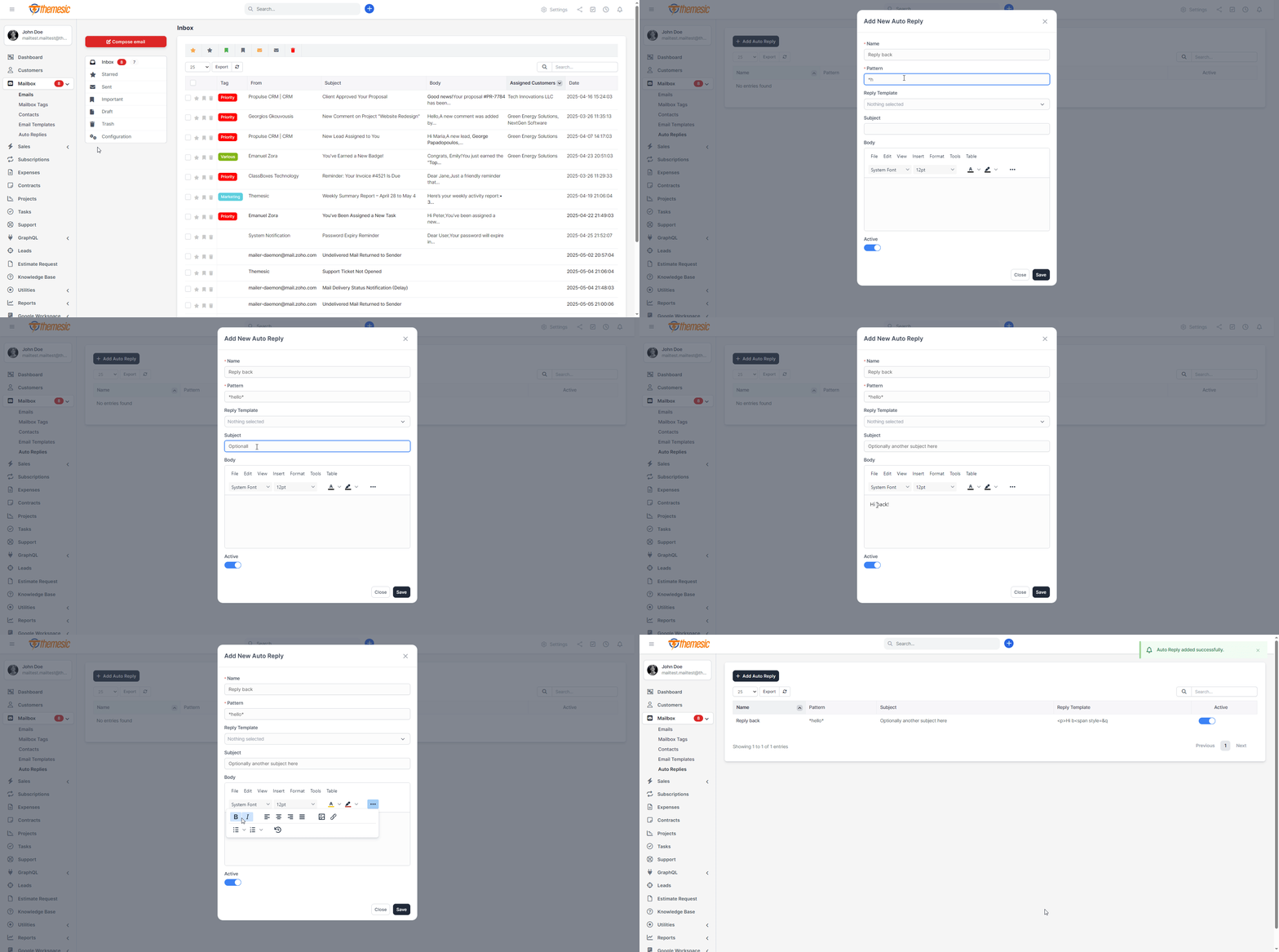
↪️ Auto Replies & Email Templates
Streamline your customer communication with powerful auto-reply rules and custom email templates built right into Perfex CRM’s mailbox module. Automatically send personalized messages when leads, tickets or clients reach specific stages in your workflow, saving time and ensuring consistent follow-up every time.
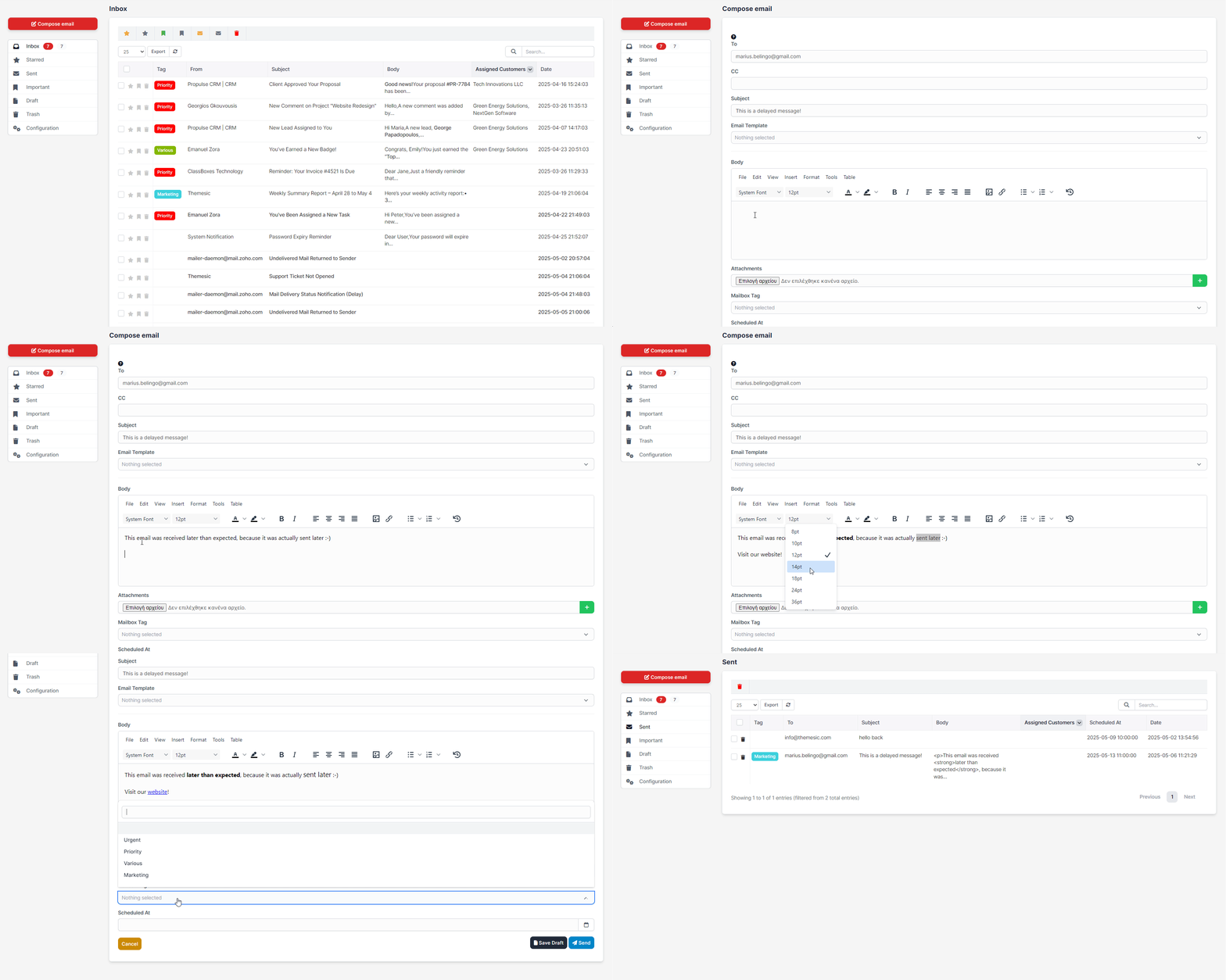
⏰ Schedule Emails (Send Later)
Never miss the ideal send-time again: compose your emails now and schedule them to go out at the perfect moment. Whether you’re syncing with global teams or planning drip campaigns, “Send Later” ensures your messages hit inboxes when engagement is highest.
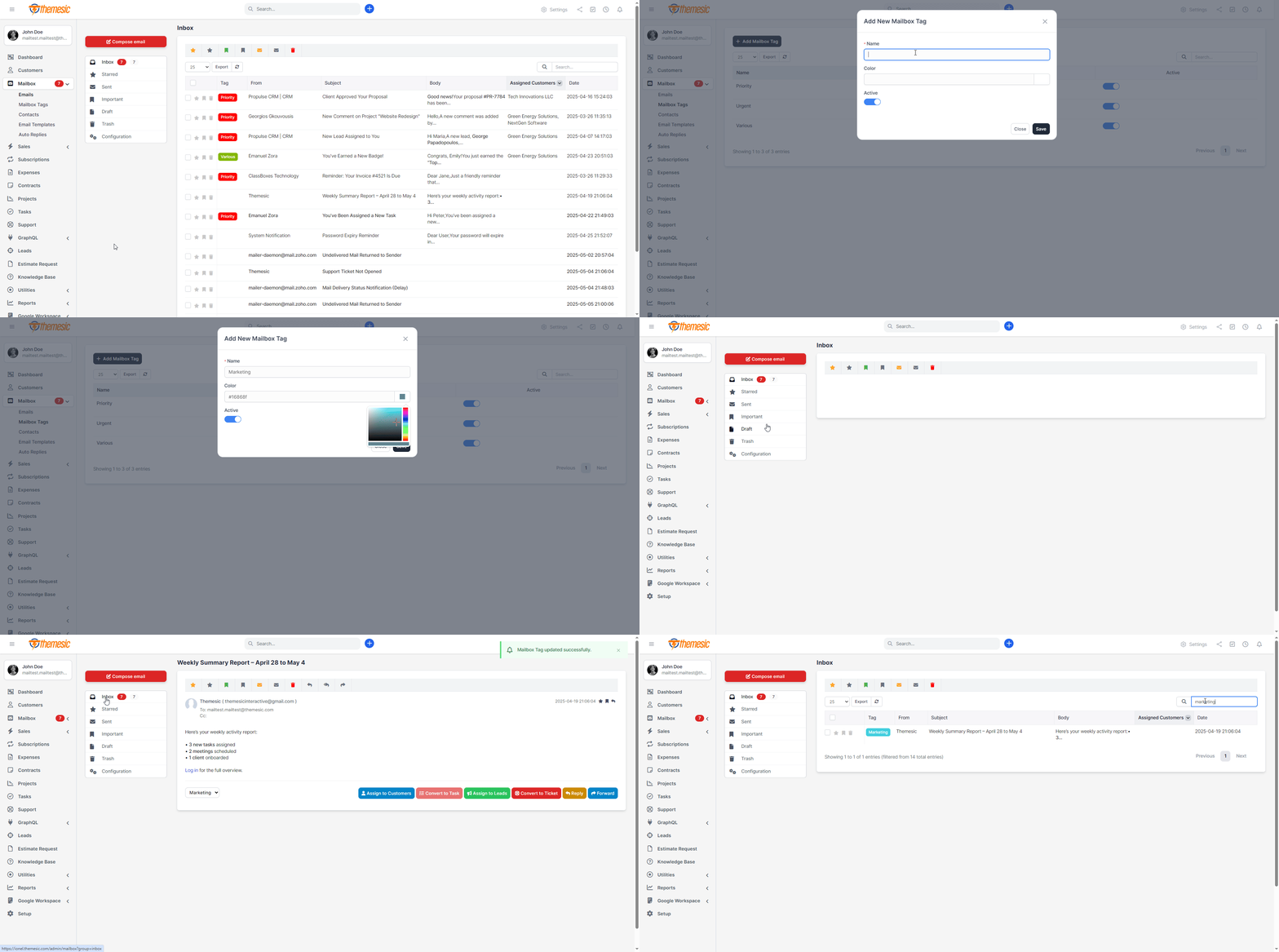
⬜️ Custom Email Tags (Labels)
Organize hundreds of conversations at a glance by applying color-coded tags and labels. Create, edit and filter by tags like “Important,” “Support,” or “VIP Lead” to segment your mailbox, prioritize responses and keep your inbox clutter-free for maximum productivity.
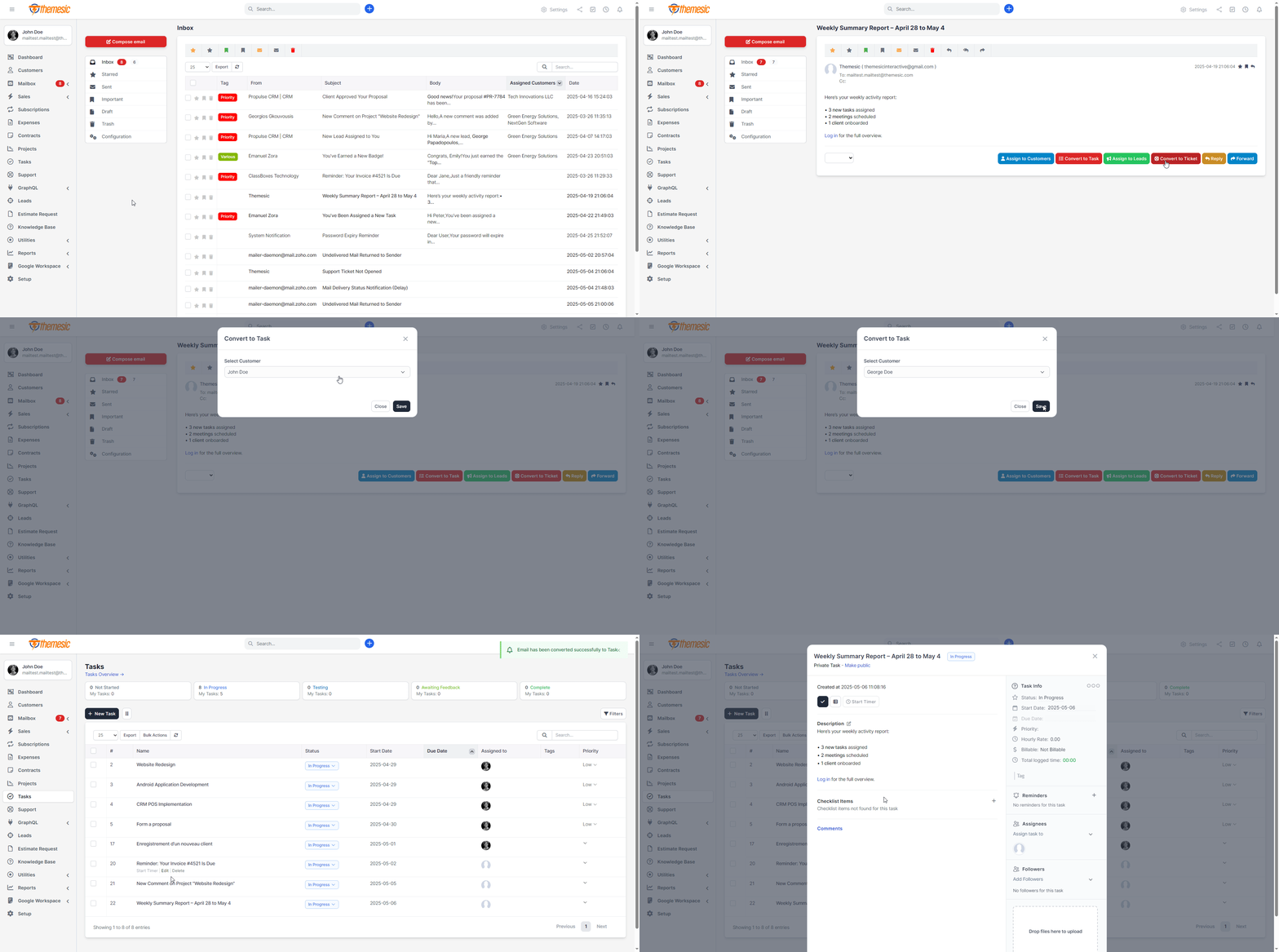
✏️ Assign Emails to Tasks
Convert any incoming email into a Perfex CRM task in seconds. With one click, assign it to your team, set deadlines and track progress – all without leaving your mailbox. Keep every to-do item linked directly to the original conversation for seamless project management.
⤵️ Convert Emails into Support Tickets
Transform customer inquiries into fully-featured support tickets inside Perfex CRM. Automatically tag, prioritize, and route emails to the right department, ensuring no request slips through the cracks and your support team stays fully aligned.
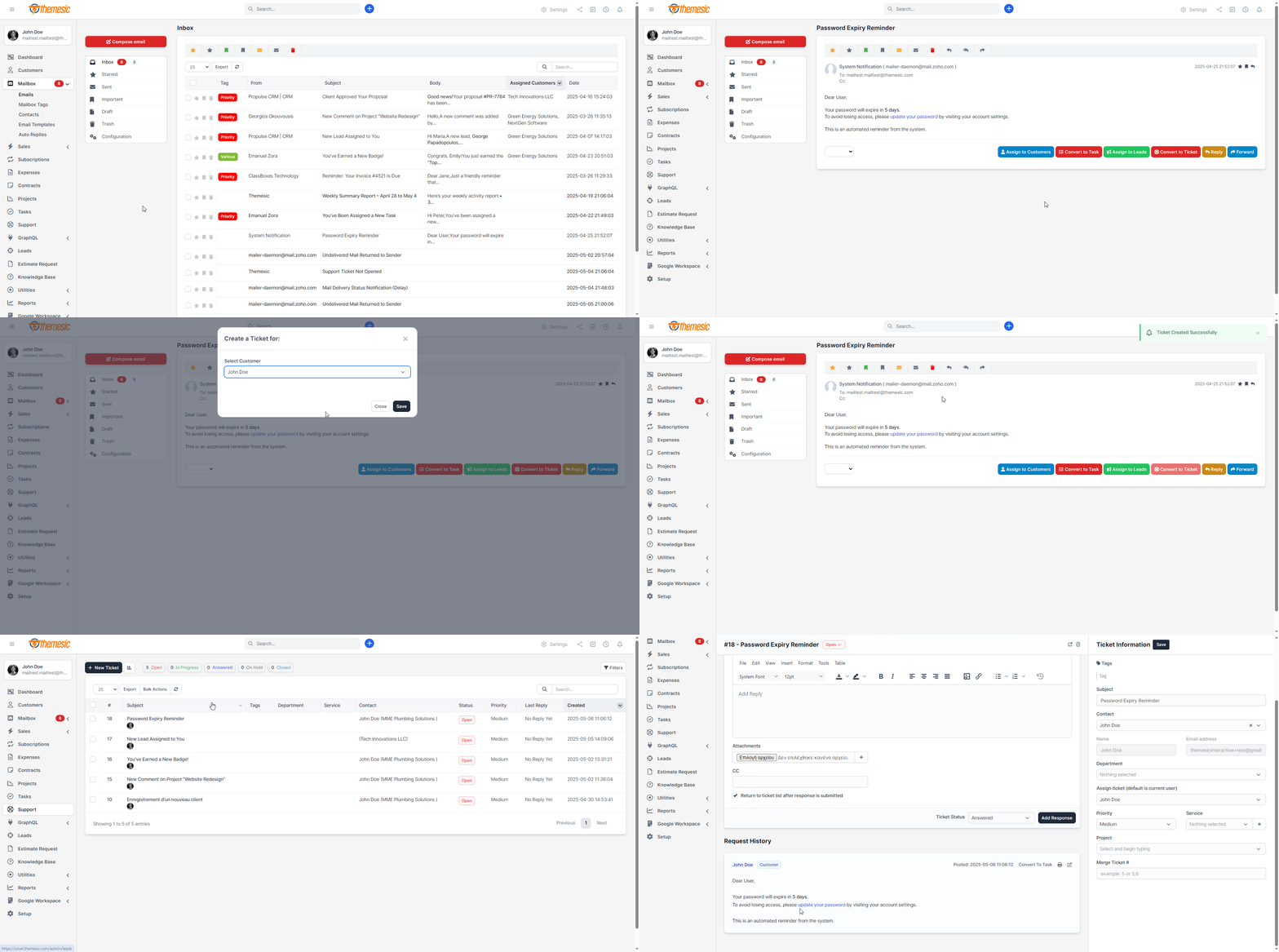
➡️ Link Emails to Leads
Seamlessly associate inbound messages with your sales pipeline by assigning emails directly to leads and opportunities. Track every conversation, set reminders, and build a complete history to close deals faster with context-rich communication.
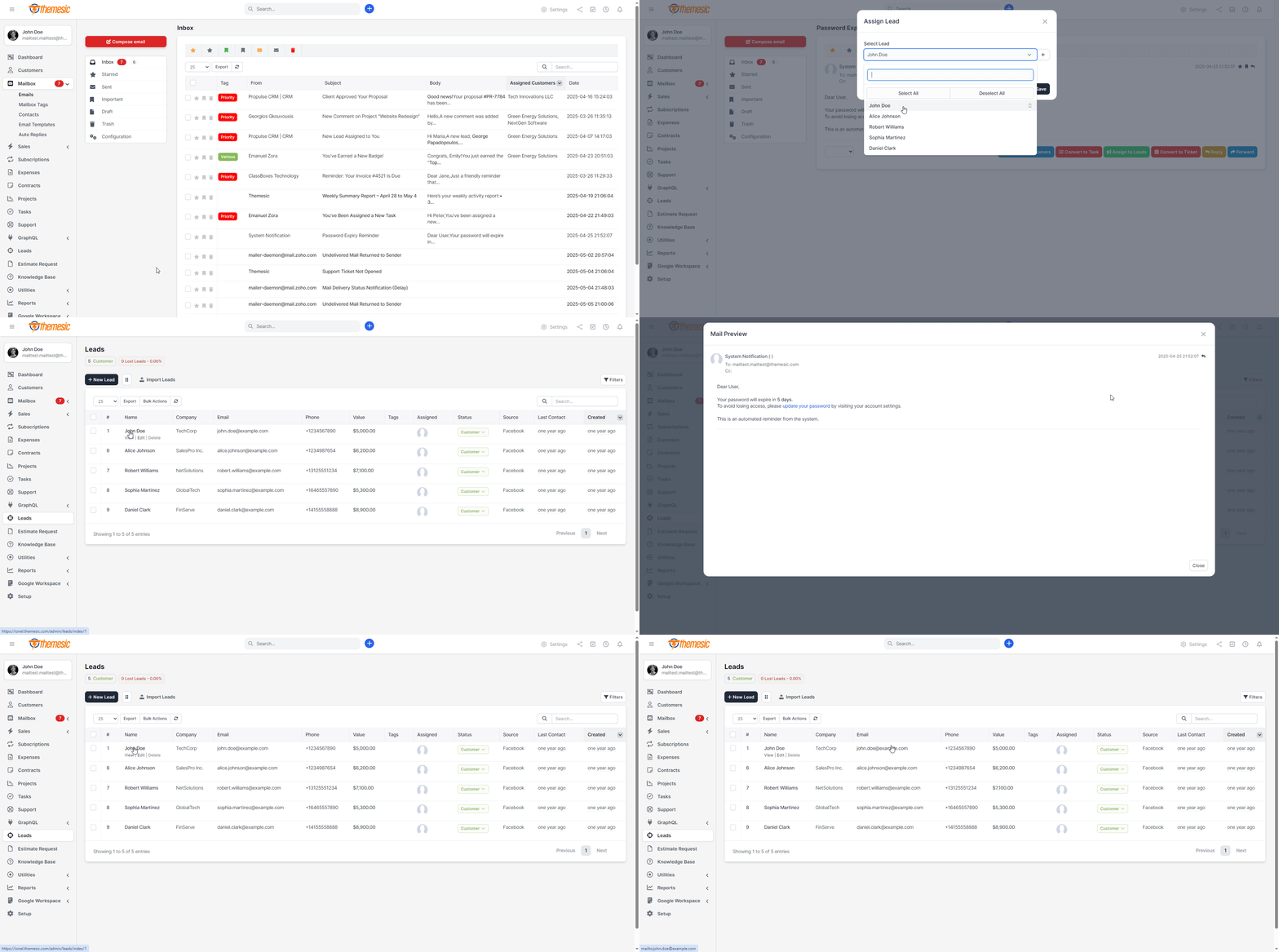
☑️ Assign Emails to Customers
Never lose sight of client conversations. Link each email to existing customers or create new contacts on the fly. Access past interactions, invoices or project details instantly, delivering personalized service that builds trust and loyalty.
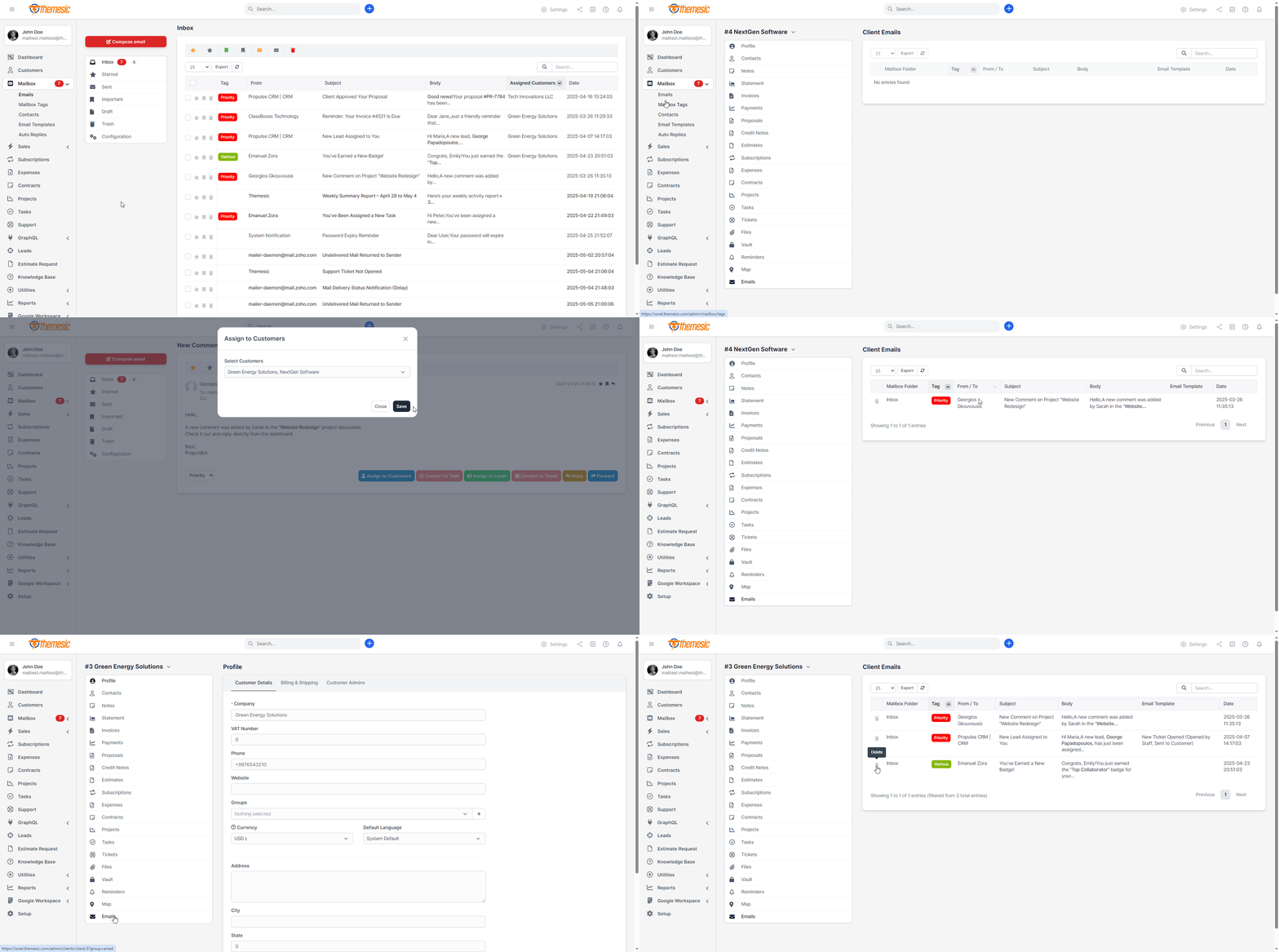
Smart CRM Auto-Link (The Bridge That Files Itself)
Stop filing email by hand. The moment a message arrives, Mailbox matches the sender to the right Customer or Lead and links it automatically – no clicks, no missed connections. It is deliberately careful: only an exact, single, active match is linked, so an ambiguous address is left for you to decide rather than guessed at. At real volume, this is the difference between a CRM bridge that works and one that only works in the demo.
Sender Context Sidebar (Know Who You Are Talking To)
Open any email and see the whole relationship at a glance: company, open invoices, overdue balance, open tickets and your recent conversation history, with a direct link to their Customer or Lead profile. Answer with full context without leaving your inbox – and turn the email into an Estimate, Invoice or Proposal in one click, pre-filled for that customer.
⚙️ Rules Engine v2 (Real Automation, Real CRM Actions)
Your rules just grew teeth. Match on sender, subject, body or recipient, then link to a client or lead, apply a tag, assign to a staff member, create a task or a support ticket, snooze, star, or capture a brand-new lead. Build the workflow once and let every incoming email route, file and follow itself.
Auto Lead Capture (Never Lose an Inbound Opportunity)
An email from a stranger to your sales address becomes a Perfex Lead automatically, filed against the original conversation. It is smart about noise: newsletters, no-reply addresses and system notifications are skipped, existing contacts and leads are never duplicated, and a rejected lead is not re-created on the next email. Real prospects in, junk out.
⏱ Follow-Up Reminders (“Remind Me If They Do Not Reply”)
Send an important email, set a reminder, and forget it. If the client goes quiet, Mailbox nudges you at the right moment with a Perfex notification. If they reply, the reminder cancels itself – Mailbox detects the response and clears it. No more deals going cold because a follow-up slipped through the cracks.
⏳ First-Response SLA (Keep Every Customer Answered in Time)
Set a first-response target and let the inbox watch the clock for you. Emails show a clear Due soon, Overdue or Answered in time badge, so your team knows exactly what needs a reply now. Automated senders are ignored, because a newsletter is not a case to answer.
Saved Replies (Answer in Seconds, On-Brand Every Time)
Build a library of canned responses – personal or shared with the whole team – and drop them into any reply with a quick shortcut. Merge tags fill in the details for you: {contact_firstname}, {client_company}, {lead_name}, {staff_fullname} and more, pulled straight from the email you are answering. Consistent, personal replies without the copy-paste.
Lead Timeline Logging (A Complete Conversation Record)
Every email linked to a lead, inbound and outbound, is written straight onto that lead’s native activity feed. Open the Lead in Perfex and the full email history is right there in the timeline, giving your sales team the context to close with confidence.
✍️ Contact Management & Autocomplete
Maintain a unified contact list with full CRM integration. Add, edit or merge contacts directly from the mailbox interface, complete with profiles, communication logs, and custom fields – keeping your address book always up to date and adding autocomplete functionality.
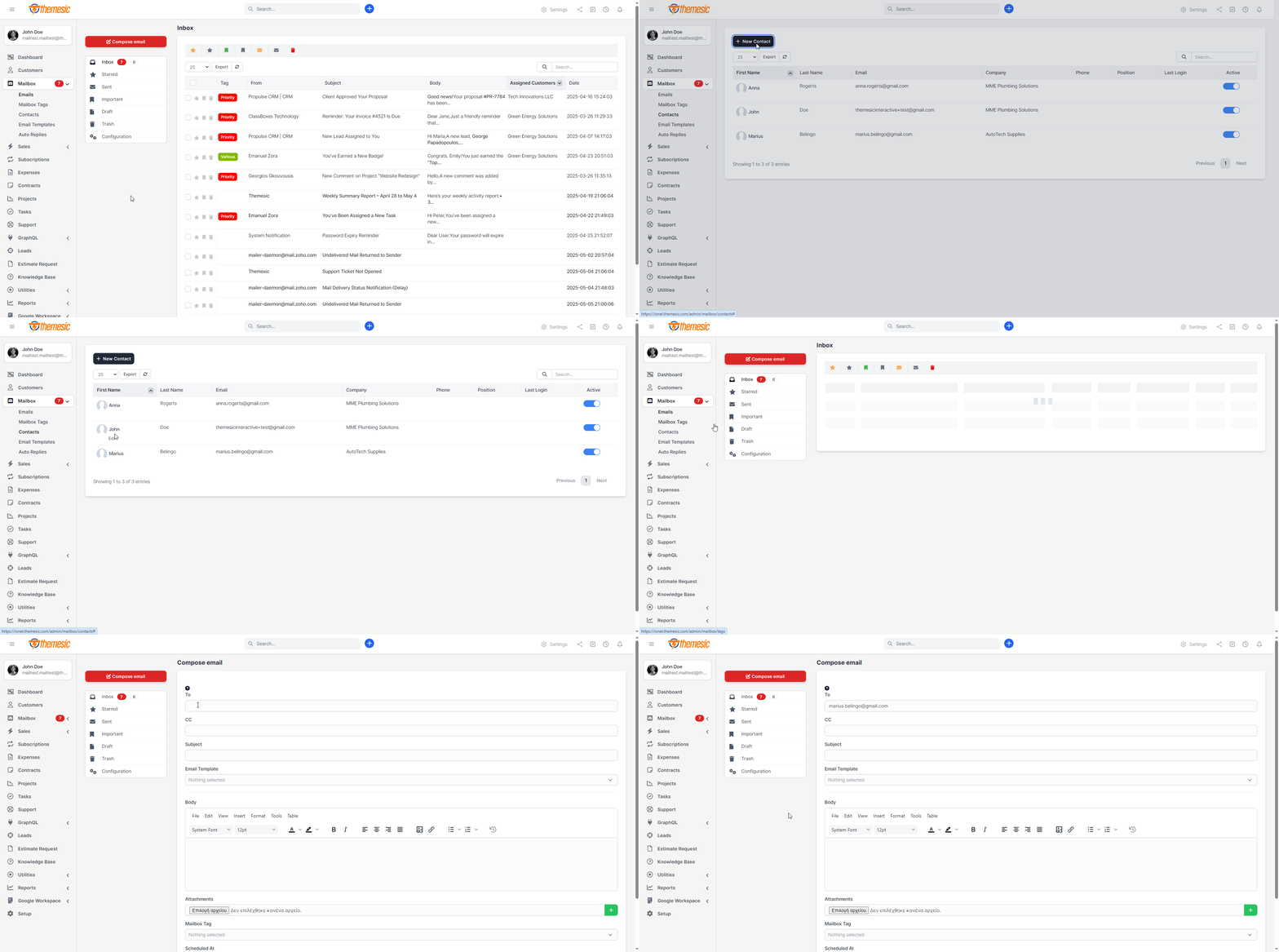
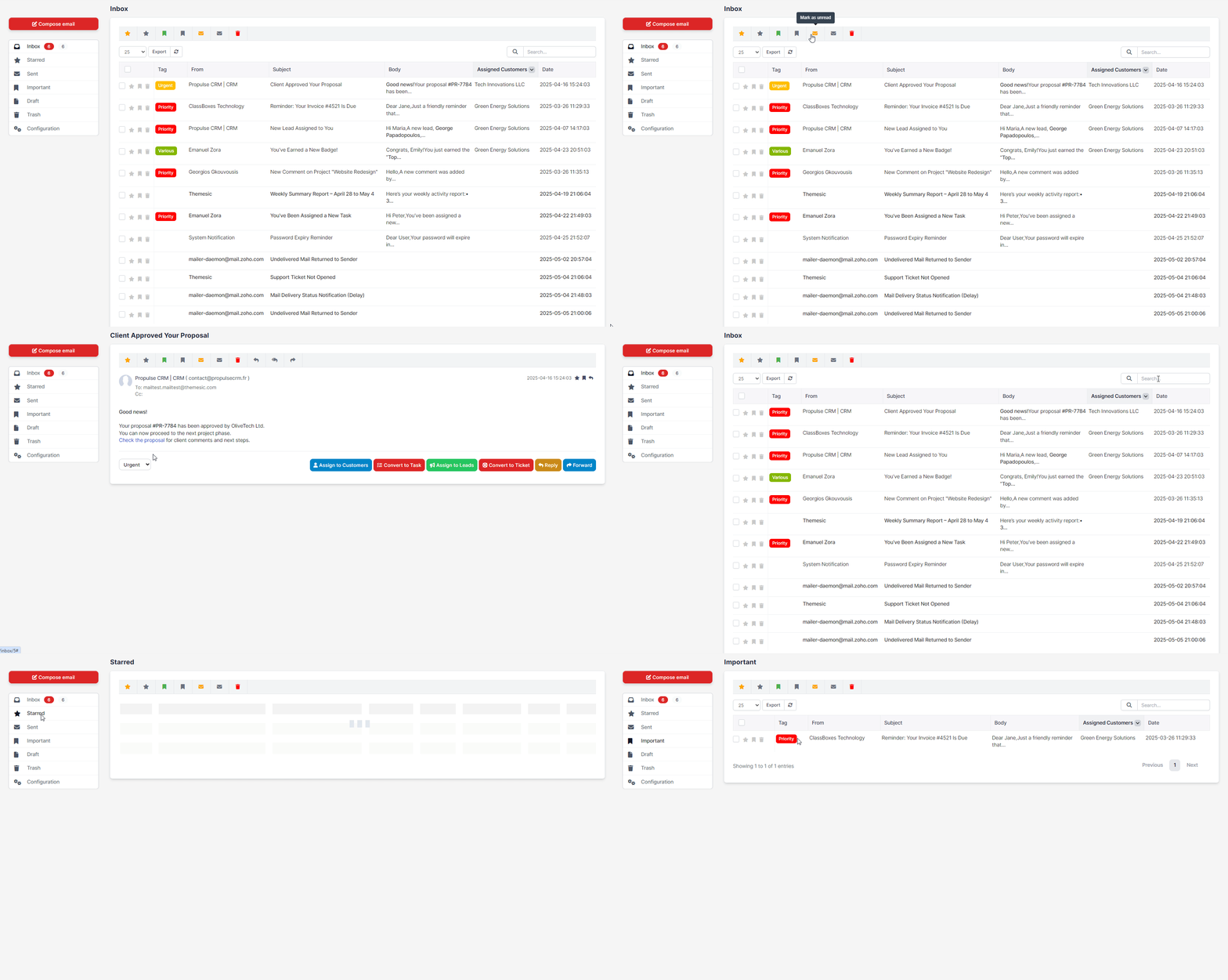
⚙️ Advanced Mailbox Organization
Keep your inbox tidy with nested folders, smart, live filtering and quick-move actions. Tag conversations by project, client or department, and access any tag in just one search – perfect for teams managing high volumes of email daily.
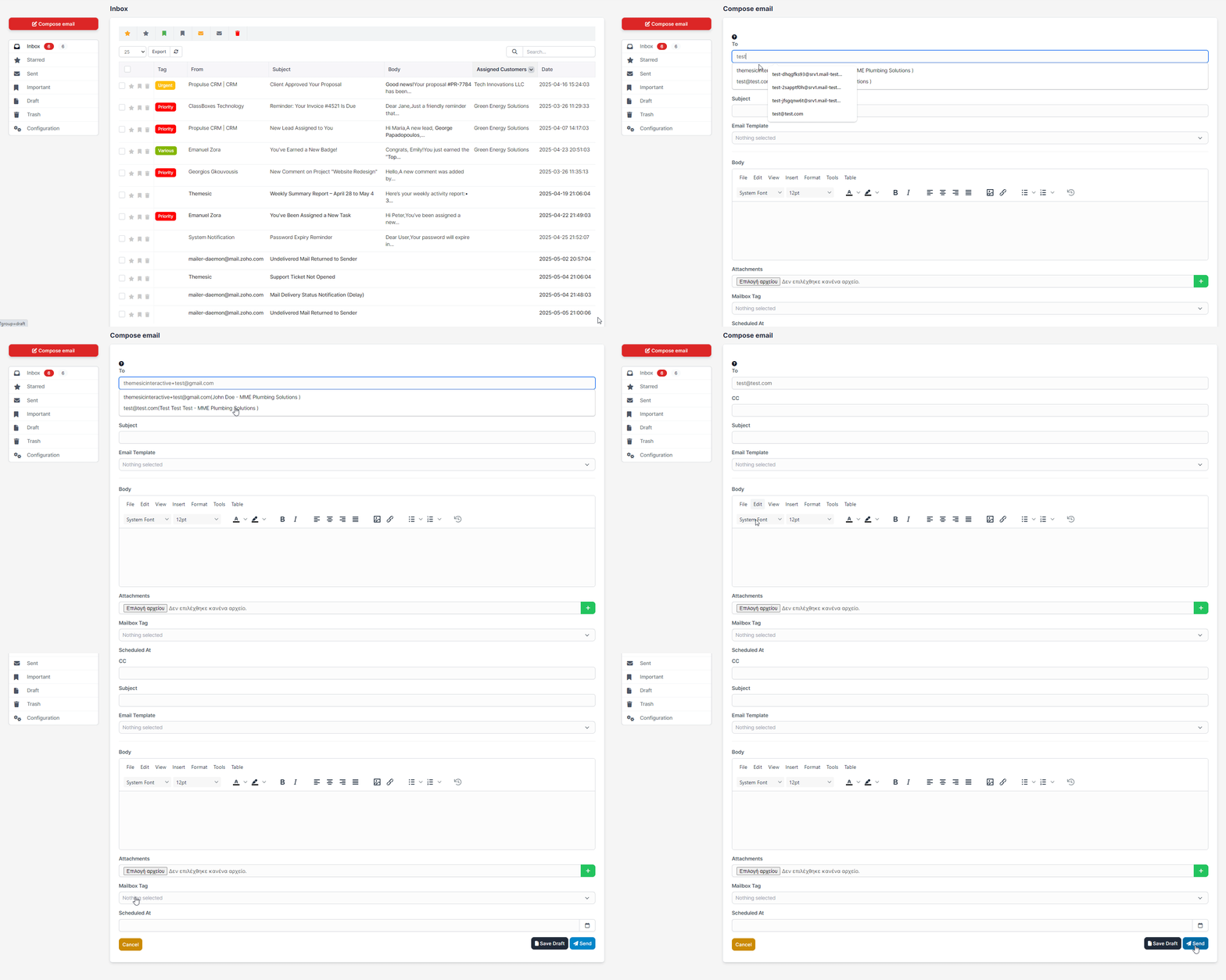
✒️ Rich Compose Experience
Craft professional emails with full WYSIWYG editing, file attachments, inline images and dynamic merge fields. Save time with reusable templates, signature management, and keyboard shortcuts – ensuring every message is polished and on-brand.
✔️ Mailbox Module for Perfex – Continuous Improvements
The Mailbox module has evolved significantly since its initial release, introducing powerful features that streamline communication and enhance customer relationship management within Perfex CRM.From the introduction of the “Conversation” tab that links emails directly to leads, to the ability to create support tickets and tasks from emails, the module continues to grow with your operational needs in mind. Each update brings meaningful improvements designed to boost productivity, improve collaboration, and simplify email management.
The 2.3 release is the module’s biggest leap yet – the point where Mailbox stops being webmail inside Perfex and becomes the command centre that runs your customer relationships from the inbox.
Incoming mail now files itself to the right Customer or Lead, a context sidebar shows open invoices, overdue balances, tickets and history beside every message, and you can spin up an Estimate, Invoice or Proposal in a single click. A rebuilt Rules Engine links, tags, assigns, snoozes, and creates tasks, tickets and leads automatically, while follow-up reminders and a first-response SLA make sure nothing goes cold and no customer waits too long.
Your team replies faster with shared saved replies and merge tags, and every conversation is logged to the lead’s timeline for a complete record. All of it rides on a security-hardened, independently audited and performance-tuned core – faster inbox, instant search, and leaner sync.
Experience a modern Gmail-style compact interface with email threading that groups conversations, a split-view preview pane for quick scanning, and advanced organization tools including Archive and Snooze features.
Automate email management with a powerful Rules System that filters and organizes emails based on custom conditions, while Advanced Search helps you find any email instantly using multiple criteria.
Enhanced security comes with OAuth2 authentication for Gmail and Outlook (no passwords needed), enterprise-grade password encryption, and per-staff IMAP configuration allowing each team member to use their own email provider.
The latest update adds per-staff read status sync, keeping your Gmail or Outlook inbox perfectly synchronized with Perfex – when you read an email in Perfex, it’s automatically marked as read on your email server.
Additional productivity features include multiple tags per email, density views for personalized layouts, column visibility controls, and a modern IMAP library with active maintenance.
This comprehensive update represents a major evolution in email management, combining powerful automation, modern security, and intuitive design to streamline your team’s daily workflow.
Stay tuned – more smart features are always on the horizon to help you manage your customer communications even more efficiently.
⚪️ Prerequisites:
- You need an IMAP account which can accept connections over SSL/TLS from a third party app (your Perfex installation). If you are running under a 2-way factor authenticator or oAuth type, you need to disable it. Elsewise, connections wont be accepted by your server. For Gmail and Outlook, you can now use OAuth2 authentication for secure, password-free connections.- You need to have cronjob of Perfex set up correctly, as per instructions found here: https://help.perfexcrm.com/setup-cron-job/
- You wont be able to use IMAP functionalities under a POP account. Make sure that your account is an IMAP-based one.
- This module was made in order to be able to view/respond to all incoming emails, within Perfex. Sent emails from this module will be stored into its ‘Sent’ folder and will use Perfex’s outgoing email settings.
- Actions like Star/Trash/Important will affect your local inbox (Perfex) and they will be stored in the database, along with their attachments in the appropriate folder. This module has no control over your IMAP server – it is an one-way sync module that will fetch your unread Inbox mails. However, with the new read status sync feature, you can optionally sync read status back to your IMAP server.
- Our module uses staff member account’s email address for login to the IMAP server (every staff member can change his/her own email from his/her profile though).
Support
It takes only a few seconds to be installed, activated and have a fully working Mailbox Perfex client.
If you have any questions, feel free to raise a support ticket at our support area.
Guys from support department will get back to you as soon as possible with a reply.
Version 2.3.1
Version 2.3.0
Version 2.2.2
Version 2.1.8
Version 2.1.9
Version 2.1.8
Version 2.1.7
Version 2.1.6
Version 2.1.5
Version 2.1.4
Version 2.1.3
Version 2.1.2
Version 2.1.1
Version 2.1.0
Version 2.0.7
Version 2.0.6
Version 2.2.4
Version 2.2.3
Version 2.2.1
Version 2.0.5
Version 2.0.4 (Perfex v3.2.1+ required)
Version 2.0.3b
Version 2.0.3
Version 2.0.2
Version 2.0.1
Version 2.0.0
Version 1.0m
Version 1.0l
Version 1.0k
Version 1.0j
Version 1.0i
Version 1.0h
Version 1.0g
Version 1.0f
Version 1.0e
Version 1.0d
Version 1.0c
Version 1.0b
Version 1.0
Related products
More digital goods in the same category or with similar tags.

PHP Scripts / Add-ons
MultiSafepay payment method for RISE CRM

PHP Scripts / Add-ons
Mollie Payment Gateway for Teachify LMS

PHP Scripts / Add-ons
Add on-Multi User - Twitter Deck

PHP Scripts / Add-ons
PayU payment method for RISE CRM

PHP Scripts / Add-ons
Braintree payment method for RISE CRM

PHP Scripts / Add-ons
Add on Auto Tweet - Twitter Deck

PHP Scripts / Add-ons
gomymobiBSB's Site Theme: Bundle #1

PHP Scripts / Add-ons
PayFast payment method for RISE CRM
Mailbox - Webmail Client & Email Automation Module for Perfex CRM
After successful payment, you will receive a download link for the source code